
Incident and claim management
On this page
Comcover's Claims Management services ensures a consistent and coordinated approach is undertaken in the recording and management of claims against the Australian Government.
What is an incident versus a claim?
Link copiedComcover's Statement of Cover defines a claim as:
- any demand by a third party against a fund member for compensation
- a request by you for indemnity in accordance with your Schedule of Cover and the Statement of Cover.
An Incident is an event or circumstance where a claim has not arisen but may do so in the future.
Importantly, it is the fund member's responsibility to contact Comcover to advise of any event or circumstance even if at the time of notification there has been no demand from a third party or obvious loss or damage suffered by the fund member.
Reporting an incident or claim
Link copiedEarly notification of an event or loss likely to give rise to a claim is crucial so Comcover is able to protect the fund member's interest and minimise any subsequent loss.
Incidents and claims are both lodged using the online claim forms available on the Comcover Launchpad.
Using the online claim forms has a number of advantages for fund members including:
- the ability to type directly into the form
- the ability to attach supporting documents directly into the form
- receiving an immediate confirmation regarding successful submission
- receiving a Comcover reference number immediately after submission
- the ability to access, export and print previously submitted forms from the Launchpad.
Monitoring incidents and claims
Link copiedThe Claims Report available in the Comcover Business Intelligence portal on the Comcover Launchpad allows you to generate reports on Claims and Incidents.
The Individual Claim Search allows you to access a detailed summary of a particular Incident or Claim.
A guide is available from the Comcover Launchpad on how to access and generate these reports.
Comcover Launchpad > User Guides > Comcover Business Intelligence: Claims Reports User Guide.
Management of incidents and claims
Link copiedIncidents and claims are managed differently.
1. Acknowledgement of an online claim form submission
When submitting an incident or claim through the online claim forms, an automatic confirmation of submission is provided and includes the claim or incident reference number.
2. Acknowledgement of registration in the Claims Management System
Once registration of the claim or Incident is complete, an email confirmation is sent to the notifier.
For incidents, the email contains:
- confirmation it has been registered as an Incident
- confirmation of the Incident reference no
- confirmation it will be treated as an Incident or ‘notification only’.
For claims, the email contains:
- confirmation it has been registered as a claim
- confirmation of the claim reference no
- confirmation and contact details of the claims consultant managing the claim.
3. Comcover business intelligence reporting
Both incidents and claims appear in the claims report and individual claim search report available in the Comcover Business Intelligence portal.
4. Closure – automatically closed
Incidents
Where no further communication has been received from the fund member or third-party, incidents are closed in our system after 6 months. Incidents may be re-opened at any time should further information be received.
Claims
Claims remain in an active or open status until they are appropriately resolved.
| Incident | Claim | |
|---|---|---|
| Acknowledgement of Submission | Yes | Yes |
| Acknowledgement of Registration | Yes | Yes |
| Confirmation of Reference No | Yes | Yes |
| Assigned to Claims Consultant | No | Yes |
| Active Management by Comcover | No | Yes |
| Appears in Comcover BI Reporting | Yes | Yes |
| Closure: Auto-closure | Yes | No |
An incident becoming a claim or a claim becoming an incident
Link copiedOccasionally an event or loss may be initially reported to Comcover as an incident however, in the weeks or months following the report, further information is provided that causes the incident to be viewed as a claim.
If this occurs, the incident record in our claims management system is updated to a claim. The claim will then be assigned a claims consultant and communication confirming the change is sent to the fund member.
The matter will now be visible in the Comcover Business Intelligence Portal as a claim and not an incident.
The matter will retain the same unique reference number assigned at lodgement.
The transition of an incident to a claim can also occur in reverse. An event of loss may be reported as a claim, however, the claim is not pursued. Depending on the individual circumstances, the claim record may be changed to an Incident report only.
Assistance
Link copiedIf you require any assistance with using the online claim forms or business intelligence portal, please contact your Comcover relationship manager on 1800 651 540 – option 3.
If you have any questions regarding your entity’s claims or incidents, please contact the Comcover claims team on 1800 651 540 – option 1.
Simple claim management process
Link copiedClaims are managed depending on the requirements and characteristics of the individual matter.
However, there are a number of procedural steps that are similar regardless of the type of claim.
Below is a simple flowchart demonstrating the key steps of a claim.
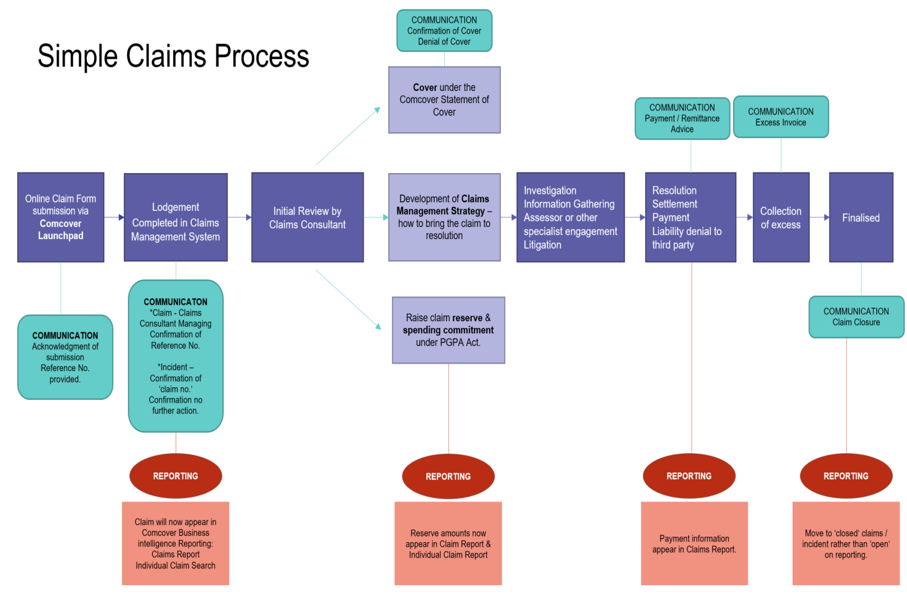
The flowchart describes the simple claims process, progressing from submission of an online claim through to finalisation. The main process runs horizontally from left to right, with related communication and reporting activities shown above and below particular stages.
- Online claim form submission
The process begins with:
- Online claim form submission via Comcover Launchpad.
- Communication:
- An acknowledgement of submission is sent, with a reference number provided.
The process then moves to lodgement.
- Lodgement
The claim is:
- Lodgement completed in claims management system.
Following lodgement, communication activities include:
- Claim: Claims consultant managing confirmation of reference number.
- Incident: Confirmation of claim number; confirmation no further action.
Reporting:
- The claim will now appear in:
- Comcover business intelligence reporting
- Claims report
- Individual claim search
The process then moves to an initial review.
- Initial review
An initial review by a claims consultant is undertaken.
From the initial review, three related activities are shown:
- Cover under the Comcover Statement of Cover.
- Communication
- Confirmation of cover or denial of cover.
- Communication
- Development of claims management strategy – how to bring the claim to resolution.
- Raise claim reserve and spending commitment under PGPA Act.
- Reporting
- Reserve amounts now appear in the claims report and individual claim report.
- Reporting
The main process continues from the claims management strategy to investigation.
- Investigation
The next stage covers:
- investigation
- information gathering
- assessor or other specialist engagement
- litigation.
This leads to resolution.
- Resolution
The resolution stage may involve:
- settlement
- payment
- liability denial to third party.
Communication:
- Payment/remittance advice.
Reporting:
- Payment information appears in the claims report.
The flow then proceeds to collection of any excess.
- Collection of excess
Where applicable, the process moves to:
- Collection of excess.
Communication:
- Excess invoice.
The process then progresses to finalisation.
- Finalised
The claim reaches the finalised stage.
Communication:
- Claim closure.
Reporting:
- The claim or incident is moved to “closed” claims/incident rather than “open” in reporting.